
Netoscope2.60 - Download
You'll be able to download in few seconds.
Publisher Description
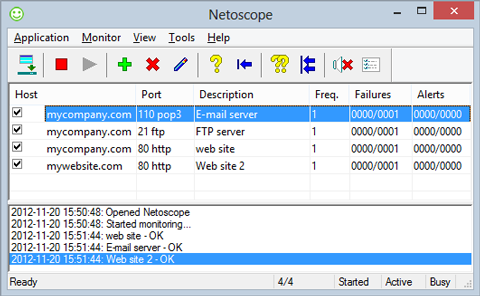
In an age where even a temporary malfunction of a web site or a mail server means loss of business, productivity, or communication, it is important to make sure that your Internet services are running around the clock. The ability to be notified when such services fail is just as important to avoid bad surprises.
Well, you don't need to stay glued to your monitor, or get a call from an angry boss or customer. You just need Netoscope.
Netoscope is a simple and effective tool to monitor Internet services such as web, ftp, or mail servers. When a monitored service fails, Netoscope can notify you about it or even correct the problem if possible. This makes it a useful tool for both client and server machines.
Netoscope provides several ways to respond to failed services. Audio and visual notifications can alert people near the machine. E-mail notifications can be used to inform a wider range of remote operators. This includes paging on-call staff if their cellular phone or pager can accept e-mail messages. Netoscope also provides a batch processing feature which can be set to run applications in response to failures. This gives you the opportunity to attempt an automatic restart or recovery of the service.
About Netoscope
This Network Monitoring program is available in English. It was last updated on 29 September, 2026. Netoscope is compatible with the following operating systems: Other, Windows.
The company that develops Netoscope is Basta Computing, Inc.. The latest version released by its developer is 2.60.
The download we have available for Netoscope has a file size of 3.1 MB. Just click the green Download button above to start the downloading process. The program is listed on our website since 2015-09-03 and was downloaded 0 times. We have already checked if the download link is safe, however for your own protection we recommend that you scan the downloaded software with your antivirus. Your antivirus may detect the Netoscope as malware if the download link is broken.
How to install Netoscope on your Windows device:
- Click on the Download button on our website. This will start the download from the website of the developer.
- Once the Netoscope is downloaded click on it to start the setup process (assuming you are on a desktop computer).
- When the installation is finished you should be able to see and run the program.
Program Details
System requirements
Download information
Pricing
Version History
version 2.60
posted on 2015-09-03
Added custom port support to SMTP server configuration.
version 1.6
posted on 2004-10-05
Added support for Windows XP features. Added support for multiple Windows user accounts. Minimized the amount of memory used when the main window is hidden. Added placeholders. Overhauled the help system.
Disclaimer
External Download
We do not host Netoscope on our servers. We did not scan it for viruses, adware, spyware or other type of malware. This app is hosted by the software publisher and passed their terms and conditions to be listed there. We recommend caution when installing it.
The external download link for Netoscope is provided to you by apps112.com without any warranties, representations or guarantees of any kind, so access it at your own risk.
If you have questions regarding this particular app contact the publisher directly. For questions about the functionalities of apps112.com contact us.
